

For businesses processing dozens or hundreds of supplier invoices every month, manual data entry can quickly become slow and difficult to control. A single typing error in an invoice number, VAT amount, or total can affect accounting records and create unnecessary reconciliation work. OCR Invoice Capture helps businesses extract invoice information automatically from PDFs, scans, images, and other documents. But simply reading invoice data is not enough. Businesses also need accuracy checks, duplicate invoice detection, VAT validation, and appropriate human review.
For UAE businesses, these controls are particularly important because tax invoices support VAT reporting and input tax recovery. The Federal Tax Authority (FTA) specifies information that must appear on tax invoices, including supplier details, TRN, invoice number, date, descriptions, taxable amounts, VAT and total amounts.
The best approach is therefore not OCR alone. It is a controlled process that combines invoice data extraction, automated validation, duplicate detection, and accounting review.
What Is OCR Invoice Capture?
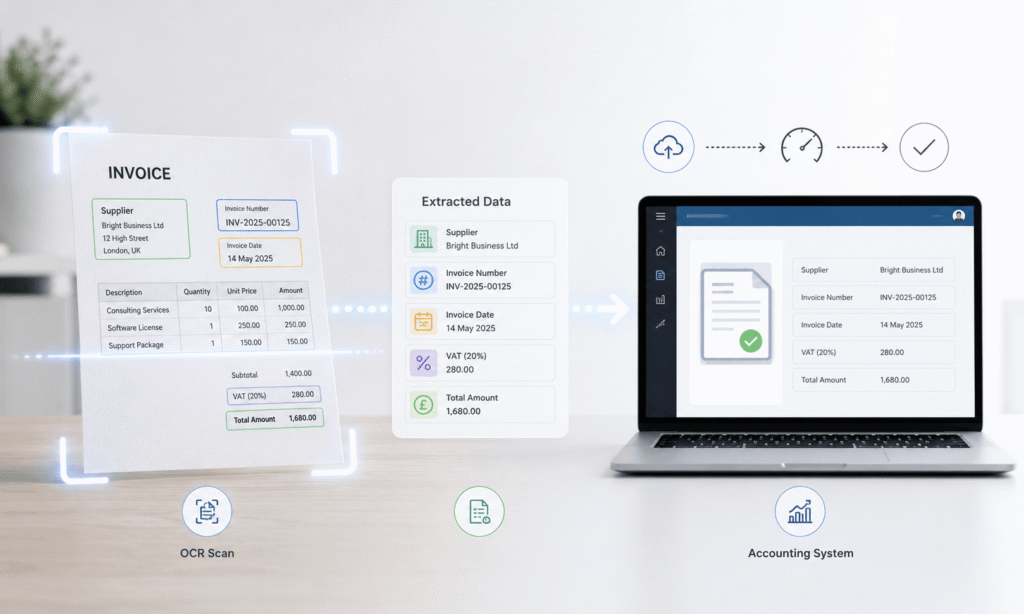
OCR, or Optical Character Recognition, converts text from documents into machine-readable information. OCR Invoice Capture applies this technology specifically to invoices so businesses can extract important accounting information without manually typing every field.
An invoice can enter the workflow as an email attachment, PDF, scanned document, or image. OCR identifies relevant information and converts it into structured data that accounting or accounts payable systems can process.
What Data Can OCR Extract From an Invoice?
Depending on the software and invoice format, invoice data extraction can identify information such as:
- Supplier name and address
- Supplier Tax Registration Number (TRN)
- Invoice number
- Invoice date
- Date of supply
- Purchase order number
- Product or service descriptions
- Quantity
- Unit price
- Discount
- Taxable amount
- VAT rate
- VAT amount
- Total invoice value
- Currency
- Payment terms
The extracted information can then move through validation and approval rules before accounting staff post it to the relevant system.
How OCR Invoice Processing Works From Capture to Approval
Effective invoice automation involves several stages. OCR is only one part of the overall process.
Step 1: Invoice Capture
The system receives invoices from sources such as email, PDF uploads, scanned documents, accounting portals, or other digital channels. Good invoice capture software should support different document formats because suppliers rarely use exactly the same invoice design.
Step 2: OCR Invoice Data Extraction
The OCR engine identifies text and attempts to map it to specific fields.
For example, it may identify:
Invoice No.: INV-4582
Subtotal: AED 10,000
VAT: AED 500
Total: AED 10,500
The system then stores these values as structured accounting data.
Step 3: Data Validation
The extracted information should be checked before it reaches the accounting ledger. Validation can compare the supplier against existing records, check whether required fields are present, and verify that amounts make sense.
Step 4: Duplicate Invoice Detection
The system compares the new invoice with existing records to identify exact or potential duplicates. This helps reduce the risk of processing the same supplier invoice twice.
Step 5: VAT Validation
VAT-related information can be checked against predefined accounting and tax rules. For UAE businesses, this can include checking the supplier’s TRN, invoice information, VAT amount, taxable amount, and total.
Step 6: Approval and Accounting Posting
Once an invoice passes the required checks, it can move to the appropriate approval workflow and then into the accounting system. Invoices that fail a rule should normally go into an exception queue for review.
OCR Invoice Accuracy Checks You Should Use
OCR technology can significantly reduce manual data entry, but it does not make every extracted value automatically correct. The quality of the original document, invoice layout, image resolution, fonts, tables, and unusual formatting can all affect extraction.
Field-Level Accuracy Checks
Businesses should validate important invoice fields before posting them.
Useful checks include:
- Invoice number
- Supplier name
- Supplier TRN
- Invoice date
- Date of supply
- Taxable amount
- VAT amount
- Total amount
- Currency
- Purchase order reference
A missing or suspicious value should trigger an exception rather than automatically entering incorrect information into the accounting system.
Mathematical Validation
Automated invoice verification can also compare the extracted amounts. For example, if an invoice shows AED 10,000 as the taxable amount and AED 500 VAT, the system can check whether the total of AED 10,500 is mathematically consistent.
This type of validation can identify issues such as incorrect decimal placement, misread numbers, or extraction errors.
Supplier Master Data Matching
The extracted supplier name and TRN can be compared with the supplier information already maintained in the accounting system. This provides another control against incorrect supplier selection and data-entry mistakes.
Confidence Scores and Human Review
Some OCR systems provide confidence scores for extracted fields. A high-confidence result may proceed automatically, while a low-confidence result can be sent to an accountant for review. This creates a human-in-the-loop process.
Automation handles repetitive work, while people handle unusual or high-risk transactions.
How Duplicate Invoice Detection Prevents Duplicate Payments
Duplicate invoices create a direct accounts payable control problem. Consider a UAE company that receives an AED 5,000 supplier invoice by email. Later, the same invoice is uploaded again by another employee. If both records enter the accounting system, the business could accidentally approve or pay the invoice twice.
What Is a Duplicate Invoice?
A duplicate invoice is generally an invoice that represents the same underlying transaction as an invoice already recorded.
Duplicate detection can compare several attributes rather than relying on one field.
These may include:
- Supplier
- Invoice number
- Invoice date
- Invoice amount
- Currency
- Purchase order
- Similar invoice descriptions
Exact Matches vs Potential Duplicates
An exact duplicate might contain the same supplier, invoice number, date, and amount. A potential duplicate is more complicated.
For example, two invoices may come from the same supplier for similar amounts and dates but have different invoice numbers. The system should flag the transaction for review rather than automatically rejecting it.
This distinction matters because legitimate recurring invoices can look similar.
Good duplicate invoice detection should therefore support exception handling, not simply block anything that looks alike.
VAT Validation for UAE Invoice Processing
VAT validation is an important part of invoice controls for UAE businesses. A valid tax invoice provides important evidence for VAT purposes. The FTA states that a tax invoice should contain specified information, including the supplier’s name, address and TRN, a sequential or unique invoice number, issue date, description of supplies, applicable amounts, VAT and total payable amount.
What Should a UAE VAT Invoice Check Include?
Depending on the transaction and invoice type, automated checks can look for:
- Tax invoice designation where required
- Supplier name and address
- Supplier TRN
- Recipient information where applicable
- Unique or sequential invoice number
- Invoice date
- Date of supply where different
- Description of goods or services
- Quantity and unit price
- Taxable amount
- Applicable VAT rate
- VAT amount
- Total amount payable
- Currency and applicable exchange-rate information where relevant
The exact requirements can vary according to the transaction and type of tax invoice, so automated systems should use appropriate rules rather than assuming every invoice follows one template.
Checking VAT Calculations
VAT validation can identify inconsistencies between:
- Taxable amount and VAT
- VAT and total amount
- Line-level values and invoice totals
- Stated VAT rate and calculated VAT
- Foreign-currency values and AED tax amounts
The FTA’s tax invoice guidance also addresses issues such as foreign-currency VAT conversion and line-item rounding.
OCR Is Not the Same as VAT Compliance
This distinction is important.
OCR reads invoice information. VAT validation checks that information against defined rules.
A system may correctly read “VAT AED 500” from an invoice, but that does not by itself prove that the VAT amount is correct or that the invoice satisfies all applicable requirements.
Businesses should therefore avoid treating successful OCR extraction as automatic tax compliance.
Common OCR Invoice Capture Errors
Even advanced invoice processing systems can encounter difficult documents.
Common problems include:
- Misread invoice numbers
- Incorrect decimal placement
- Confusion between similar characters
- Incorrect VAT amounts
- Missing line items
- Incorrect supplier identification
- Duplicate records
- Poor-quality scans
- Multi-page extraction errors
- Incorrect date recognition
- Tables being interpreted incorrectly
These risks make validation particularly important for high-value or unusual invoices.
Why Human Review Still Matters
Businesses should consider manual review when:
- OCR confidence is low
- The invoice contains unusual formatting
- VAT information appears inconsistent
- A duplicate warning is triggered
- Supplier details do not match master data
- Important invoice fields are missing
- The transaction has a high financial value
The goal is not to eliminate people from the process. The goal is to allow accounting teams to spend less time typing data and more time reviewing exceptions and financial controls.
OCR Invoice Capture vs Manual Invoice Processing
Manual invoice processing requires employees to read documents, enter data, calculate amounts, check supplier information, identify duplicates, and prepare invoices for approval.
This approach can work for a small volume of invoices, but repetitive data entry becomes harder to manage as transaction volume grows.
Automated OCR invoice processing can help by:
- Reducing repetitive data entry
- Standardizing invoice data capture
- Speeding up invoice processing
- Supporting duplicate detection
- Applying consistent validation rules
- Creating clearer approval workflows
- Improving visibility over exceptions
However, businesses should not assume that automation automatically produces perfect results.
The strongest process combines OCR, validation rules, duplicate detection, accounting controls, and human review.
Best Practices for Implementing OCR Invoice Capture
Before introducing automated invoice processing, businesses should establish clear controls.
Set Validation Rules Before Automation
Define which fields are mandatory and which conditions should trigger an exception.
For example, an invoice may require review if the supplier TRN is missing or if the VAT calculation does not match the configured rule.
Create Duplicate Detection Rules
Do not rely only on invoice numbers.
Use combinations of supplier, invoice number, amount, date, purchase order and other relevant information to identify possible duplicates.
Add Human Approval for Exceptions
Not every invoice should receive the same level of automation.
A straightforward invoice may move through the process automatically, while a suspicious or incomplete invoice should require human review.
Keep an Audit Trail
Businesses should retain appropriate records showing what happened during the invoice workflow.
This can include:
- Original invoice
- Extracted information
- Validation results
- Corrections
- Approval history
- Accounting posting details
For UAE VAT purposes, recordkeeping is also important. The FTA states that taxable persons must retain VAT invoices issued and received for a minimum of five years.
Review OCR Performance Regularly
Useful performance indicators include:
- Extraction accuracy
- Manual correction rate
- Exception rate
- Duplicate detection rate
- Invoice processing time
- Straight-through processing rate
Regular monitoring helps businesses identify where the automation process needs improvement.
Practical Example: OCR Invoice Capture for a UAE SME
Imagine a UAE SME receives around 500 supplier invoices each month.
Previously, employees manually entered supplier names, invoice numbers, amounts and VAT details into the accounting system.
The company introduces an OCR invoice processing workflow.
First, invoices received through email and PDF uploads enter a central capture process. OCR extracts the invoice information.
Next, the system compares the supplier against existing records and checks key invoice fields.
The duplicate invoice detection process identifies whether the invoice number, supplier, amount and other information already exist in the system.
The VAT validation process then checks the captured tax information against the company’s configured rules.
Invoices that pass the controls move to approval. Low-confidence invoices, duplicate warnings or VAT inconsistencies go to an accountant.
The result is not simply faster data entry. The company creates a more structured invoice verification and accounts payable control process.
How to Choose OCR Invoice Processing Software
Businesses should evaluate software based on the entire invoice workflow rather than OCR capability alone.
Look for These Features
Important features may include:
- OCR and invoice data extraction
- Support for different invoice formats
- Supplier matching
- Duplicate invoice detection
- VAT validation
- Invoice approval workflows
- Exception handling
- Accounting software integration
- Audit trails
- User permissions
- Reporting and analytics
Questions to Ask Before Implementation
Before selecting a solution, ask:
- Can it process different UAE supplier invoice formats?
- Can VAT validation rules be configured?
- How does it identify duplicate invoices?
- Can low-confidence fields require human review?
- Does it retain the original invoice?
- Can it integrate with the existing accounting system?
- Can users track corrections and approvals?
- Can the business export appropriate records when needed?
Businesses should also consider the UAE’s developing electronic invoicing environment. The FTA explains that an e-Invoice is structured invoice data exchanged electronically; PDFs, Word documents, images, scanned copies and emails are not themselves considered e-Invoices.
This distinction is important when planning long-term invoice automation.
OCR Invoice Capture and UAE Accounting Controls
Invoice automation should form part of a wider accounting control framework.
Businesses can use invoice processing workflows to support:
- Accounts payable controls
- Supplier verification
- VAT recordkeeping
- Expense management
- Invoice approval
- Duplicate prevention
- Audit trails
- Financial reporting
However, software does not automatically make a business VAT compliant.
Businesses still need appropriate accounting policies, accurate records, suitable documentation, and professional review where required.
The FTA continues to update its VAT guidance and legislation, so businesses should check current official requirements when designing or reviewing their tax processes.
How Ripple Business Setup Supports UAE Accounting & VAT Compliance
Ripple Business Setup helps UAE businesses manage their accounting, bookkeeping, VAT, and tax compliance requirements with practical, business-focused support. From maintaining accurate financial records to assisting with VAT processes and accounting controls, the team helps businesses keep their financial operations organized. For businesses adopting OCR Invoice Capture, Ripple Business Setup can also help review accounting workflows and ensure invoice processing aligns with broader bookkeeping and VAT requirements.
Whether you are a startup, SME, mainland company, or free zone business, getting the right accounting and tax processes in place can reduce errors and make ongoing compliance easier.
Need help with accounting or VAT compliance in the UAE? Contact Ripple Business Setup to discuss the right solution for your business.
FAQ
What is OCR invoice capture?
OCR invoice capture uses optical character recognition to extract information from invoices and convert it into structured data that accounting or business systems can process.
How accurate is OCR invoice processing?
Accuracy depends on the OCR technology, document quality, invoice layout and validation controls. Businesses should use confidence checks and human review for uncertain or unusual invoices.
Can OCR detect duplicate invoices?
Yes. Invoice processing systems can compare fields such as supplier, invoice number, date, amount and purchase order to identify exact or potential duplicates.
Can OCR validate VAT on invoices?
OCR can extract VAT-related information, while separate validation rules can check calculations, required fields and other configured tax controls. OCR extraction alone does not establish VAT compliance.
Is OCR invoice processing suitable for UAE businesses?
Yes. It can support invoice capture, accounting workflows, VAT-related checks and accounts payable controls. However, businesses should configure the process according to applicable UAE requirements.
Does OCR replace accountants?
No. OCR automates repetitive data capture. Accountants and finance teams remain important for reviewing exceptions, applying professional judgment and maintaining appropriate accounting and tax controls.
What should businesses check before posting an OCR-captured invoice?
Businesses should consider checking supplier details, invoice number, invoice date, taxable amount, VAT, total amount, duplicate status, approval status and any low-confidence OCR fields.
Conclusion
OCR Invoice Capture can streamline invoice processing while improving accuracy, duplicate detection, and VAT checks. For UAE businesses, combining automation with validation rules and human review creates a more reliable and compliant accounting workflow.
Disclaimer: This article is for general informational purposes only and does not constitute legal, tax, or accounting advice. UAE VAT and accounting requirements may change, so businesses should verify the latest guidance from the Federal Tax Authority or consult a qualified professional before making compliance decisions.