


Businesses generate thousands of digital records every year, from invoices and contracts to purchase orders, payment confirmations, and approval emails. When these records sit across email inboxes, accounting software, shared drives and employees’ computers, preparing for an audit can become unnecessarily difficult. Digital audit evidence gives businesses a structured way to collect, organize and retrieve the documents that support financial transactions. A well-designed system does more than store files. It creates a clear audit trail showing what happened, which documents support the transaction, who approved it and how it was recorded in the accounts.
For UAE businesses, organized records also support tax compliance. The Federal Tax Authority (FTA) requires taxable persons to maintain records and documents that support information submitted in Corporate Tax returns and other filings.
What Is Digital Audit Evidence?
Digital audit evidence is electronic information that an auditor can use to verify a business transaction, balance, accounting entry or financial statement item. It can include the original document itself, supporting correspondence, system records or evidence showing that a transaction was properly authorized and completed.
Common examples include:
- Sales and purchase invoices
- Tax invoices and credit notes
- Customer and supplier contracts
- Purchase orders
- Delivery notes
- Receipts
- Bank statements
- Payment confirmations
- Expense claims
- Payroll records
- Accounting system reports
- Email approvals
- Digital signatures
- Board or management approvals
- Asset purchase and disposal records
The value of digital audit evidence comes from its connection to the underlying transaction. An invoice by itself may show the amount charged, but a contract, purchase order, delivery record and payment confirmation can provide a much clearer picture.
Why Businesses Struggle to Organize Audit Evidence

Having digital documents does not automatically mean a business has audit-ready documentation.
Finance teams often face problems such as:
- Invoices stored across multiple folders
- Contracts saved separately from related transactions
- Approvals buried inside email conversations
- Duplicate versions of documents
- Unclear filenames
- Missing purchase orders
- Unreadable scanned documents
- Documents stored on individual employees’ computers
- Weak backup procedures
- No consistent retention process
These problems become particularly visible during an audit. A finance employee may remember that an approval exists but spend hours searching for the email or attachment.
The better approach is to organize evidence continuously instead of trying to reconstruct the audit file immediately before an audit.
What Documents Should Be Included in a Digital Audit Evidence File?
A strong digital audit file should contain enough supporting documentation to explain important financial transactions from beginning to end.
Invoice and Revenue Evidence
For sales transactions, consider retaining:
- Customer contracts
- Customer purchase orders
- Sales invoices
- Delivery notes or service completion records
- Credit notes
- Customer receipts
- Bank payment evidence
- Relevant correspondence
The exact evidence required depends on the transaction and the business model.
Purchase and Expense Evidence
For purchases and operating expenses, useful records include:
- Supplier agreements
- Purchase orders
- Supplier invoices
- Goods received notes
- Expense receipts
- Approval records
- Payment confirmations
- Bank statements
Keeping these records together makes it easier to demonstrate that an expense relates to the business and was properly recorded.
Contract and Agreement Evidence
Contracts provide important commercial context. They can explain pricing, payment terms, services, obligations and the period covered by a transaction.
Businesses may need to organize:
- Customer contracts
- Supplier agreements
- Service agreements
- Lease agreements
- Amendments
- Renewals
- Relevant schedules and appendices
When a contract changes, retain the amendment or updated version rather than relying only on the original agreement.
Approval and Authorization Evidence
Approvals can demonstrate that the appropriate person authorized a transaction.
Examples include:
- Email approvals
- Digital workflow approvals
- Electronic signatures
- Purchase approvals
- Expense approvals
- Management authorizations
Where an approval forms part of the audit trail, retain enough information to identify the transaction, approver and date.
How to Organize Digital Audit Evidence Step by Step
A consistent structure can make digital audit evidence significantly easier to manage.
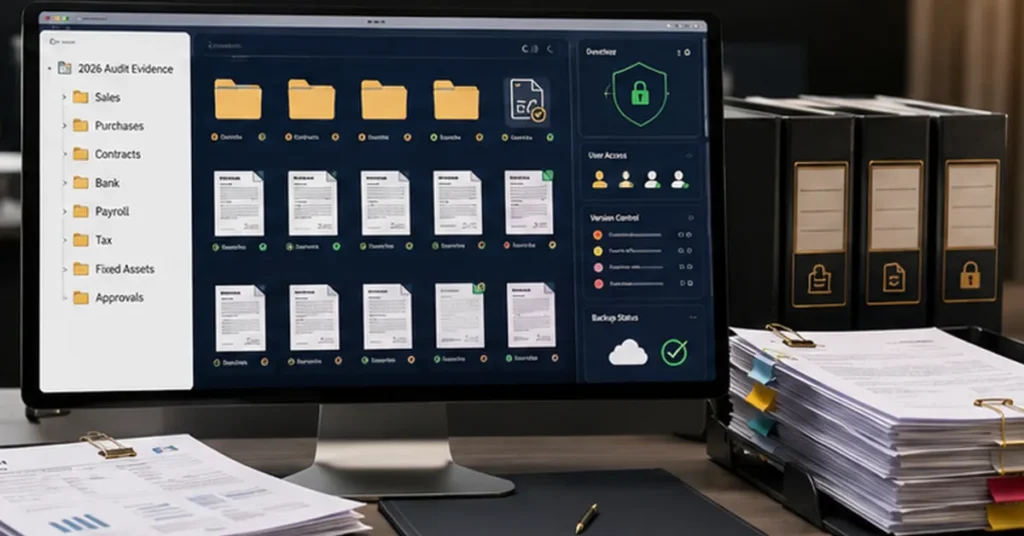
1. Create a Standard Digital Folder Structure
Start with a simple structure that employees can understand.
For example:
2026 Audit Evidence
├── Sales
├── Purchases
├── Contracts
├── Bank
├── Payroll
├── Tax
├── Fixed Assets
└── Approvals
Larger businesses can add subfolders for departments, customers, suppliers, months or transaction types.
The objective is not to create hundreds of folders. The objective is to make the location of a document predictable.
2. Use Consistent File Naming
A consistent naming system makes documents easier to search.
One practical format is:
Date – Document Type – Customer/Supplier – Reference Number
For example:
2026-08-18-Supplier-Invoice-ABC-INV1045.pdf
For contracts, a business might use:
2026-08-18-Service-Agreement-ABC-Ltd.pdf
Avoid names such as invoice-final-new.pdf or scan123.pdf. They provide little information when someone needs to locate the document months later.
3. Link Related Documents
One of the most useful principles in digital audit evidence management is connecting related records.
For example:
Contract → Purchase Order → Invoice → Approval → Payment
This sequence creates a clearer audit trail.
If an auditor asks why a payment was made, the finance team can move through the supporting documents instead of searching unrelated folders.
4. Separate Drafts From Final Records
Businesses often create several versions of contracts, invoices and reports.
Use clear version control and identify the final approved document.
For example:
- Draft
- Review
- Approved
- Final
Once a document becomes an official business record, restrict unnecessary editing to reduce confusion.
5. Protect Access to Sensitive Records
Digital audit evidence may contain commercially sensitive and personal information.
Businesses should consider:
- Role-based access
- Strong passwords
- Multi-factor authentication
- Regular access reviews
- Secure backups
- Access logs
- Appropriate encryption and security controls
Employees should have access to the records they need without giving every user unrestricted access to the entire archive.
6. Create a Document Retention Process
Retention should not be based simply on available storage space.
Businesses should identify applicable legal, tax, accounting and contractual requirements and configure their record-keeping process accordingly.
For UAE tax purposes, the current Tax Procedures framework generally requires relevant accounting records and commercial books to be maintained for specified periods, with different rules applying in particular circumstances. The Ministry of Finance also amended the Tax Procedures Executive Regulation in 2026, including changes affecting record-retention periods in certain refund-claim situations.
How to Build an Audit Trail for Invoices and Contracts
An audit trail shows the sequence behind a financial transaction.
Consider a UAE company purchasing equipment from a supplier.
The transaction might follow this path:
- The company signs a supplier agreement.
- An authorized employee creates a purchase order.
- The supplier delivers the equipment.
- The supplier issues an invoice.
- The finance or management team approves the invoice.
- The company makes the payment.
- The accountant records the transaction.
- Supporting documents are stored in the digital audit file.
This structure allows an auditor to understand the commercial reason for the transaction and trace it through the accounting records.
The stronger the connection between the documents, the less time the finance team may need to spend explaining basic transaction details.
How Digital Audit Evidence Supports UAE Tax and Accounting Compliance
Organized financial records have importance beyond an external audit.
UAE Corporate Tax Records
The FTA states that taxpayers should maintain financial statements and documents supporting information reported in Corporate Tax returns and other filings. The FTA has also specifically emphasized maintaining records supporting Corporate Tax return information, including transaction records and records of assets and liabilities where applicable.
This means businesses should be able to connect accounting entries with underlying documentation when required.
UAE VAT Documentation
VAT-registered businesses must retain relevant VAT documentation, including tax invoices, tax credit notes and records of supplies and purchases. The FTA states that VAT invoices issued and received must generally be retained for at least five years. Businesses should therefore make tax documentation part of their normal digital record-keeping process rather than treating VAT files as a separate year-end task.
Accounting and Financial Reporting
Well-organized records also support:
- Financial statement preparation
- Bank reconciliations
- Expense verification
- Tax return preparation
- Management reporting
- External audits
- Internal reviews
The UAE Tax Procedures Executive Regulation identifies accounting records and supporting documents such as correspondence, invoices, licences and contracts among the records businesses may need to maintain.
Digital Audit Evidence vs Paper Records: Which Is Better?
Digital records can provide significant practical advantages when businesses implement appropriate controls.
| Factor | Digital Evidence | Paper Records |
|---|---|---|
| Searchability | Fast with proper indexing | Usually manual |
| Storage | Highly scalable | Requires physical space |
| Sharing | Easy | Requires copying or scanning |
| Version control | Easier to manage | More difficult |
| Backup | Can be automated | Requires physical protection |
| Retrieval | Fast when organized | Often slower |
| Audit trail | Can integrate with systems | Often manual |
The key point is that simply scanning paper documents does not create an effective digital audit system. Businesses still need proper naming, indexing, access controls, backups, and retrieval procedures.
The FTA’s guidance also recognizes electronic record storage, provided records remain accessible and legible when required.
Common Digital Audit Evidence Mistakes to Avoid
Avoid these common mistakes when managing financial documentation:
- Saving invoices without useful reference numbers
- Keeping contracts separate from related transactions
- Deleting emails containing important approvals
- Using personal email accounts for business records
- Keeping only screenshots instead of original documentation where the original is needed
- Failing to back up important records
- Allowing unrestricted document editing
- Maintaining several conflicting final versions
- Uploading poor-quality scans
- Waiting until an audit begins to organize documents
The biggest mistake is treating audit preparation as an annual project.
An audit-ready business maintains evidence throughout the year. That approach can make missing documents easier to identify while the relevant transaction is still recent.
A Practical Digital Audit Evidence Checklist
Use this checklist as a starting point for an internal review:
- Invoices have unique reference numbers
- Contracts and amendments are retained
- Purchase orders match relevant purchases
- Approval evidence is available
- Payment evidence is retained
- Bank records are reconciled
- Tax invoices are properly stored
- Files use consistent naming conventions
- Final versions are clearly identified
- Access permissions are reviewed
- Backups are maintained
- Records can be retrieved quickly
The checklist should be adapted to the business’s industry, accounting system, transaction volume, and applicable legal and tax requirements.
How Accounting Software Can Improve Digital Audit Evidence Management
Accounting software can reduce the manual work involved in maintaining audit documentation.
Depending on the system, businesses may be able to:
- Attach documents to transactions
- Search invoices quickly
- Track payment status
- Maintain transaction histories
- Record approvals
- Reconcile bank transactions
- Generate financial reports
- Reduce duplicate data entry
Document-management tools can also help employees locate contracts, invoices, and supporting records without searching through multiple email accounts.
However, software does not replace internal controls. A poorly designed process can still produce incomplete or unreliable evidence even when the business uses sophisticated technology.
Digital Audit Evidence Example: A UAE SME
Consider a UAE trading company that stores supplier invoices in email inboxes, WhatsApp conversations, and separate employee folders. When its auditor requests supporting documentation for several purchases, the finance team knows the documents exist but cannot quickly locate every contract, purchase order, approval, and payment confirmation.
The company introduces a centralized digital evidence structure.
Each transaction follows a consistent process:
Supplier Contract → Purchase Order → Invoice → Approval → Payment → Accounting Entry
The company also introduces standard filenames and assigns responsibility for uploading documents.
The improvement is straightforward: finance staff can identify missing evidence earlier, retrieve documents more efficiently, and provide auditors with a clearer transaction trail.
The lesson is not that every business needs expensive software. A consistent process and disciplined document management can make a significant difference.
How Ripple Business Setup Can Support Your Accounting and Audit Preparation
UAE businesses can benefit from professional support when managing accounting records, tax documentation, and audit preparation. Ripple Business Setup can assist businesses with bookkeeping, accounting records, VAT documentation, Corporate Tax support, financial reporting, and audit preparation. The right process can help businesses maintain organized records throughout the year rather than preparing everything when an audit or tax deadline approaches.
For support with your UAE accounting and compliance requirements:
Phone: +971 50 593 8101
WhatsApp: +971 4 250 0833
Email: info@ripplellc.ae
FAQ
What is digital audit evidence?
Digital audit evidence is electronic information used to support financial transactions, accounting records, and financial reporting. It can include invoices, contracts, purchase orders, bank records, approvals, payment confirmations, and relevant accounting-system information.
What documents are commonly used as audit evidence?
Common documents include invoices, contracts, purchase orders, delivery records, receipts, bank statements, payment confirmations, expense records, approval records, and accounting reports. The evidence required depends on the transaction and the auditor’s procedures.
How should invoices be organized for an audit?
Use consistent filenames, folders, and reference numbers. Where practical, connect invoices with related purchase orders, contracts, approvals, and payment evidence. This creates a clearer audit trail and makes retrieval easier.
How do contracts support audit evidence?
Contracts establish important commercial terms, including the parties involved, services or goods provided, pricing, payment terms, and contractual obligations. They can help auditors understand the business reason and terms behind a transaction.
Can emails be used as audit evidence?
Relevant business emails can support an audit when they document approvals, decisions, transaction details, or other important business activities. Businesses should retain relevant communications in a controlled and accessible manner.
How long should businesses keep digital audit records in the UAE?
There is no single retention period that applies identically to every business record. UAE tax rules prescribe specific periods depending on the type of record and circumstances. For example, the Tax Procedures Executive Regulation generally provides five years for specified accounting records of taxable persons, with additional rules for certain circumstances. VAT invoices generally have a minimum five-year retention requirement, while some records can have longer periods.
Businesses should verify the applicable requirement for each record category and consider any changes to the legislation before deleting records.
Final Takeaway
Digital audit evidence works best when businesses treat documentation as part of their everyday financial process. Invoices should connect with contracts, purchase orders, approvals, delivery records, and payments. Files should use consistent names, authorized users should control access, and backups should protect important records.
For UAE businesses, organized documentation also supports VAT, Corporate Tax, and broader financial compliance. The FTA emphasizes maintaining records that allow tax information and transactions to be verified, making accessible supporting documentation an important part of good financial management.
Disclaimer: This article provides general information for educational purposes and does not constitute legal, tax, accounting, or audit advice. UAE tax and record-keeping requirements can change and may depend on the nature and circumstances of a business. Businesses should verify current requirements with the Federal Tax Authority or obtain advice from a qualified professional.